See where construction profit is built before the bid goes out.
SERVVIAN® helps contractors understand breakeven, labor cost structure, pass-through support, and pricing discipline in one clear view. This page makes the model simple: cover the full cost structure first, separate the revenue streams correctly, and then layer profit where it belongs.
One page that explains both revenue streams.
For hybrid contractors, sold labor revenue and pass-through support revenue should be visible as different lanes. That is the cleanest way to understand breakeven coverage, markup behavior, and where profit is actually being earned.
Labor Profit View
This lane shows what happens after the labor cost structure is fully supported. It helps users see markup, margin, hourly gain, and total lump-sum labor profit without guessing.
Pass-Through Profit View
This lane keeps support revenue readable. Users can see markup by component, the blended fee, and the resulting total profit without confusing that story with sold labor pricing.
Users can instantly tell that sold labor and pass-through support are not the same pricing lane.
Finance and operations can explain how cost recovery works before profit is layered into pricing.
When the structure is visible, pricing decisions feel less like guessing and more like control.
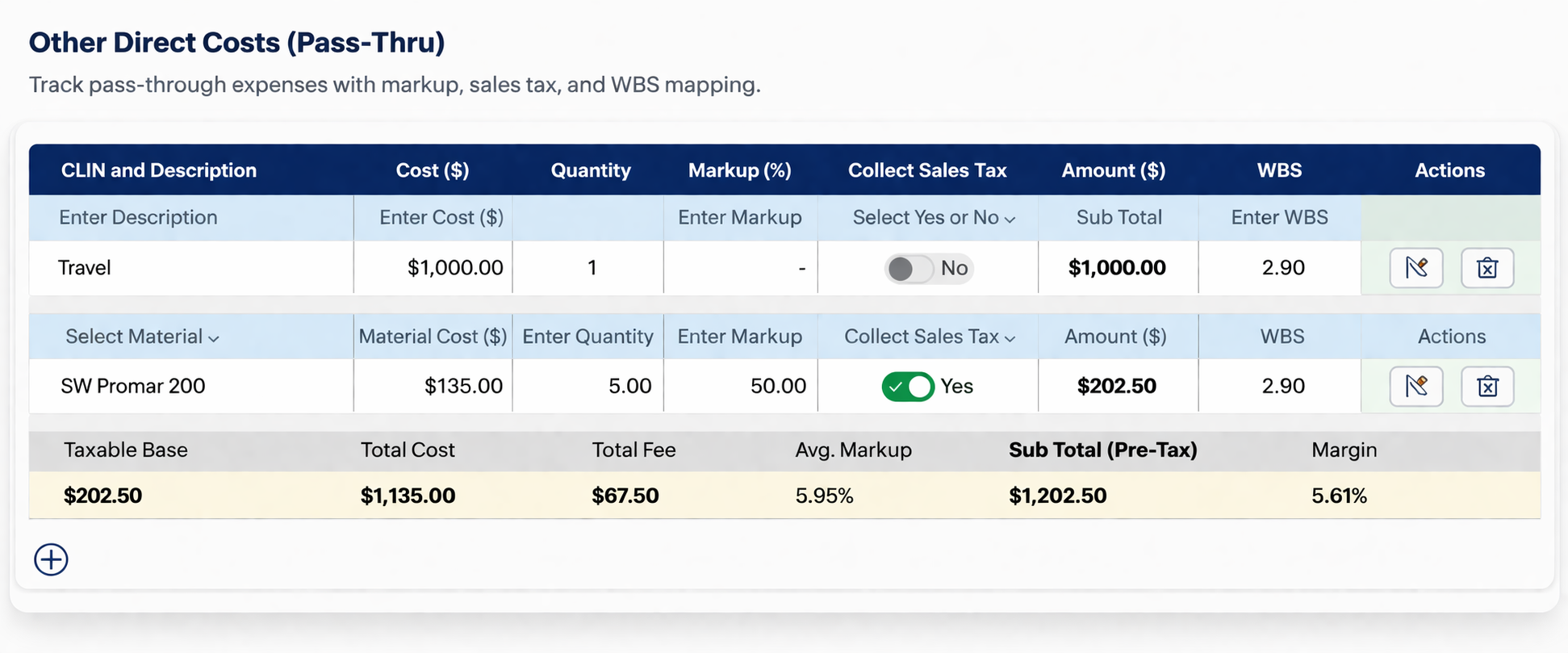
See pass-through support and pricing behavior in a real snapshot.
This example shows how pass-through components, markup, and blended fee behavior are presented in a clean interface. Instead of guessing how support revenue affects pricing, users can see it directly and understand how it connects back to the full estimate.
Clear separation. Better pricing decisions.
Pass-through support is often where pricing gets unclear. Different components can carry different markup logic, and blended fees can hide how profit is actually formed. This view keeps those elements readable so the estimate tells the real story.
Built around breakeven discipline, not spreadsheet hope.
The page should reinforce the big idea behind the SERVVIAN® content library: breakeven is not profit, G&A is real, cost bases matter, and hybrid contractors may need separate visibility across sold labor and pass-through support before a bid can be trusted.
Construction Pricing BreakEven Guide
Start with the full framework for labor rates, breakeven structure, pricing logic, and profit protection.
Why BreakEven Is the Most Critical Number in Construction Bidding
Show users why weak cost structure visibility turns into weak pricing and unreliable margin.
What Is G&A Rate in GovCon?
Help visitors understand how business-wide cost recovery connects to pricing strategy and job confidence.
How Davis-Bacon Wages Impact Your True Labor Cost
Keep labor compliance tied to the real cost story, including ripple impact across burden and fringe.
Increase Construction Profits with Breakeven Visibility
Position the product story around better clarity, stronger pricing discipline, and cleaner profit recovery.
See the Bigger SERVVIAN® Picture
Give users an easy next step if they want the broad platform story instead of a single topic page.
Let users jump straight to the financial terms.
Your glossary already supports filtered term links. These chips help users open the glossary with the term already loaded, which keeps the page helpful without making it feel too dense.
Understand the language without leaving the buying flow.
Use these quick links to define the terms that matter most on this page. That keeps the overview easy for first-time visitors while still giving experienced estimators the depth they want.
Good overview pages do two jobs.
They make the story easy for a first read, and they quietly support deeper learning for serious buyers. That is why this version pairs simple visual cards with direct paths into your pillar pages and glossary.
- Simple headline structure for better scanning
- High-end card layout without feeling complicated
- Internal links placed where they naturally support intent
- Terminology support without dumping a wall of text on the page
Profit gets clearer when the cost structure gets cleaner.
Use this overview to show the model fast: separate the revenue streams, support breakeven correctly, recover G&A with the right base, and then let profit show up where it is actually earned.